Search
  Sign Up
  VIP Club
Cashy Login & Registration Guide

On this page, you will find a complete guide on how to complete Cashy registration, log in to your account and pass the necessary verifications. International players can sign up on a smartphone or desktop, deposit fiat or crypto and play. The Cashy Casino Online requires only an email address to sign up. Alternatively, Google one-click registration allows instant account creation. The guides and details are listed below.
Cashy Log In Procedure Steps
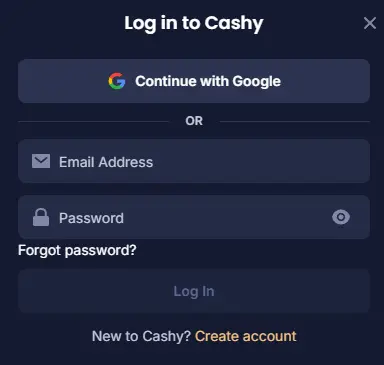
To log in to your account, you need the email address you used to register and your password. If you have these, follow the steps:
- Initiate process: Tap the “log in” button in the upper right corner of the site.
- Enter details: Enter your credentials.
- Confirm: You will be logged into the account.
- Play: You can now deposit and play.
The Cashy login now feature is available on all devices. Just keep in mind that if you signed up on a desktop, you’ll need to log in on a mobile device. Don’t sign up again.
Log in via PWA or Mobile Version
Mobile access works via any smartphone browser or the downloadable PWA. Using the mobile website requires the same steps as on desktop. To complete a Cashy app login through the PWA instead, use the following steps:
- Load: Use Chrome or Safari on your device to load the website.
- Open features: Tap the three dots in Chrome or “Share” in Safari.
- Install it: Tap the “Add to Home Screen” button.
- Allow installation: Approve the app installation process.
- Load: Tap the icon from the home screen and enter your credentials.
Login Protection Technologies
Once you have a Cashy account and access it via any device, you also get various safety technologies at your disposal. The main ones are:
- 2FA: This tech allows you to add another layer of authorization before you sign in. Usually a one-time code is used.
- Security question: Players must answer a question every time they want to change a password. This prevents unauthorized password changes.
- Phone number verification: How to activate Cashy account? You simply tap the link the casino sent you to your email address. You may also verify your phone number, which will be used for 2FA.
Cashy Registration: Steps You Need to Complete
Only players who are aged 18 or above can sign up on the site and create a profile. Underage gambling is strictly prohibited. To sign up, follow these steps:
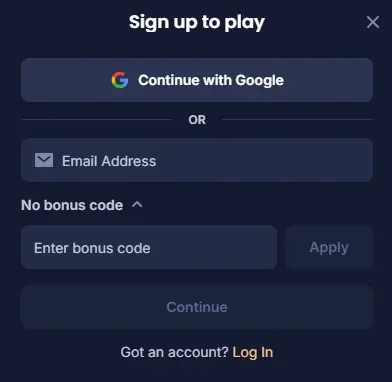
- Initiate process: Tap the “sign up” button in the upper right corner of the platform.
- Enter email: Share the email address and enter a promo code (optional).
- Provide details: The Cashy sign up process requires specific information you need to enter.
- Approve: Double-check and confirm the details.
- Log in: You can now log in to your profile.
The site is licensed eGaming Curaçao, meaning it has a list of restricted countries. If you are visiting the site from such a such country, registration will be unavailable. In addition, the Cashy login sign up procedures can be completed via your Google account.
KYC Cashy Verification Procedure
All members must pass KYC (Know Your Customer) verification after successful registration. This involves sending document photos and waiting for approval. In addition, the process should prove you made a deposit to the casino. After you complete Cashy login, open your profile and select “verification.” There, you will upload all of these photos. Required document types break down as follows:
| Process | Documents | Details |
|---|---|---|
| Identity | ID card, passport or driver’s license. | Proving your identity and age. |
| Address | A check, utility bill or bank document. | Attaching an address to your identity. |
| Deposit | Screenshot of the transaction. | Proving you have made a deposit to the site. |
| Payment method | Additional documents may be needed. | For verifying a specific payment method. |
Login Problems and Solutions
If you have any issues or complications with accessing the Cashy login account, take a look at this table. Here you will find the most effective solutions and fixes:
| Issue | Cause | Solution |
|---|---|---|
| Wrong password | You changed your password or entered an old one. | Reset the password. |
| Wrong email | You made a mistake entering the email address. | Double-check the email address. |
| Login unavailable | Accessing the site from a restricted country. | Wait until you get back. |
How to Reset a Password
Players can reset their password at any time to improve security or if they have forgotten their old one. Just follow these steps:
- Initiate Cashy log in: tap the “log in” button in the upper right corner.
- Start resetting: tap the “forgotten your password” button.
- Tap the link: Click the link the casino will send to your email address.
- Enter a new password: Create a new password.
- Log in: You can now access your account again.
Closing Cashy Casino Account Guide
The casino lets you deactivate the account or delete it completely. The procedures are a bit different. To deactivate it, follow this procedure:
- Log in: Complete the Cashy casino login procedure using a smartphone or a desktop.
- Open my profile: Go to the “My Account” section.
- Load security: Tap the “security” tab on the left side.
- Deactivate: Click the “Deactivate your Account” red button on the right side.
- Enter details: Share the required information and approve.
This procedure will exclude you from playing on the site as long as you like. But you can also permanently delete the account from the casino’s database. In this case, contact the support team using the live chat and explain the issue. Complete a basic Cashy verification and your profile will be permanently deleted from the database.
FAQ
How do I create an account?
Tap "Sign Up," enter your email (or continue with Google for instant registration), provide your details, and confirm. You must be 18 or older to register.
How do I log in on a different device?
Use the same email and password you registered with — the same login works across desktop, mobile browser and the installed PWA, no need to sign up again.
I forgot my password — how do I reset it?
Tap "Log In," then "Forgotten your password," and follow the link sent to your email to create a new one.
Why isn't my login working?
The most common causes are an incorrect password (reset it), a mistyped email, or accessing the site from a restricted country. Check the login troubleshooting table on this page for quick fixes.
What is 2FA and how do I set it up?
Two-factor authentication adds a one-time code requirement before signing in. Enable it in your account's security settings for extra protection.
How long does identity verification (KYC) take?
Verification typically takes 24 to 72 hours once your documents are submitted. Cashy may occasionally request additional documents or higher-quality photos.
What's the difference between deactivating and deleting my account?
Deactivation is temporary and reversible — deposits stop but withdrawals remain available. Deletion is permanent: your account, history and any remaining balance are removed and can't be recovered.
Can I register from any country?
No. The Curaçao license comes with a list of restricted countries where registration isn't permitted — check the Terms and Conditions before signing up.
I signed up with Google — what data is shared?
Google sign-in shares your name and email to set up your account. No additional account permissions are requested beyond that.